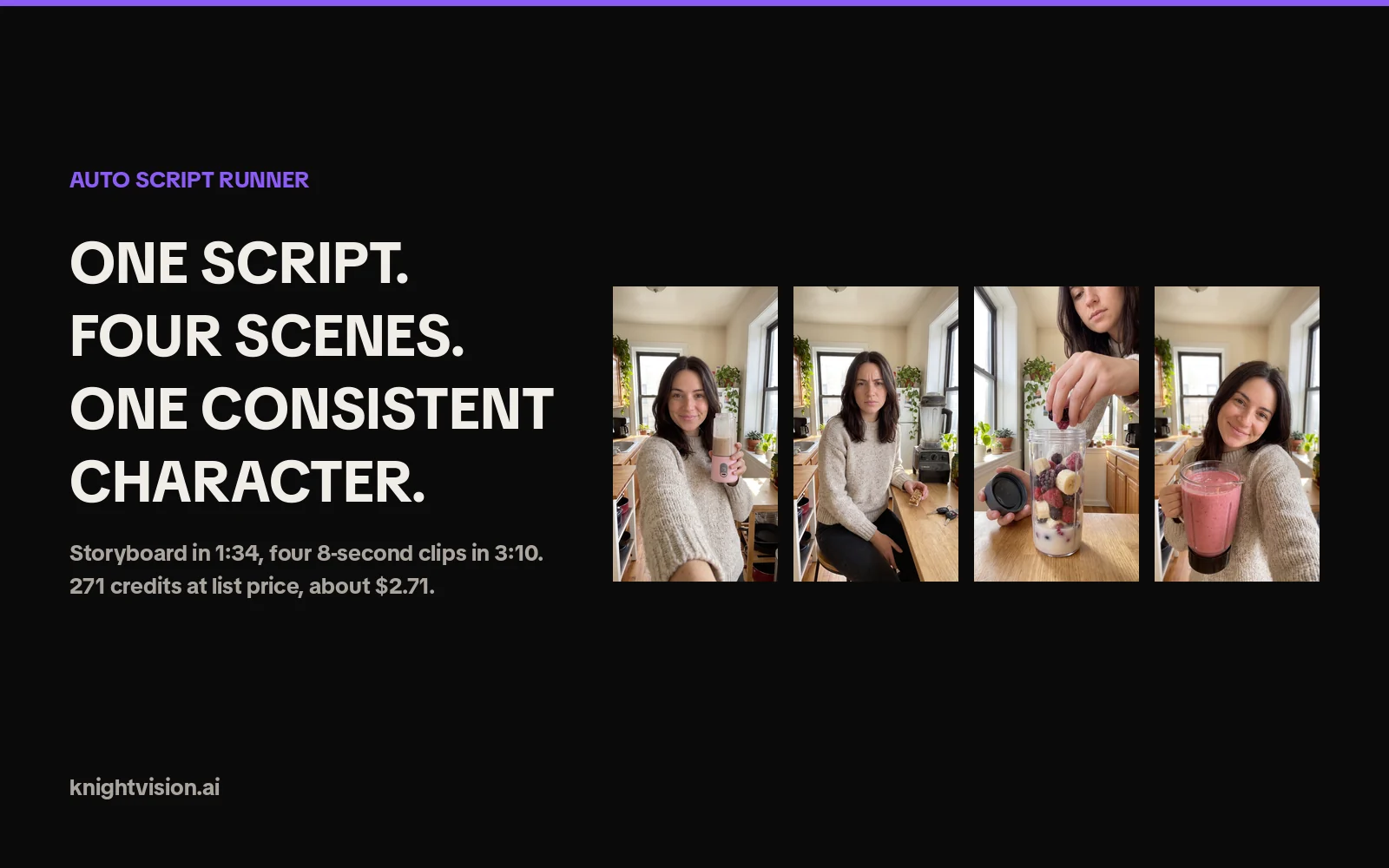
The Auto Script Runner is the Auto Mode of Knightvision's Script Runner. You paste one script with a character description, a few scenes and the spoken lines. It generates a consistent AI character, one storyboard image per scene and, after you approve the storyboard, one video clip per scene. A four-scene ad with the default models costs 271 credits, about $2.71, and the videos are only billed once you have seen and approved the scene images. In our test run on October 8, 2026, the character and all four storyboard images were ready about a minute and a half after clicking Run, and the slowest of the four clips finished 3 minutes 10 seconds after we approved the storyboard.
This guide explains what the Auto Script Runner does, how the three phases and the storyboard gate work, what each video model costs per clip, how long a run takes, how to write a script it can parse, and where the limits are. The numbers come from the app itself and from one real run; the market figures link to their sources.
What is the Auto Script Runner?
The Auto Script Runner is a script-to-video pipeline for UGC-style ads inside Knightvision. UGC stands for user-generated content: the handheld, talking-to-camera style that performs on TikTok, Reels and Meta placements. Instead of prompting one clip at a time and hoping the person looks the same in the next one, you describe the character once, list the scenes, write the dialogue, and the runner builds the whole ad as a set of matching clips.
It is open to every logged-in Knightvision account. There is no separate plan for it; you pay per image and per clip in credits, and the Partner API exposes the same pipeline for developers.
| You give it | You get back |
|---|---|
| One character description (or your own photo) | One character image, used as the reference for every scene |
| One short setting per scene | One storyboard image per scene, 9:16, with the same character |
| One spoken line per scene | One video clip per scene, with the scene image as its first frame |
| A video model and an image model | Downloadable clips, an optional merged video and a saved run in your history |
What it is not: it is not a lip-sync avatar tool that pastes a talking head over a stock background. Every scene is a fully generated shot with its own setting, framing and action, which is why the storyboard review step exists.
How does the Auto Script Runner turn a script into a video ad?
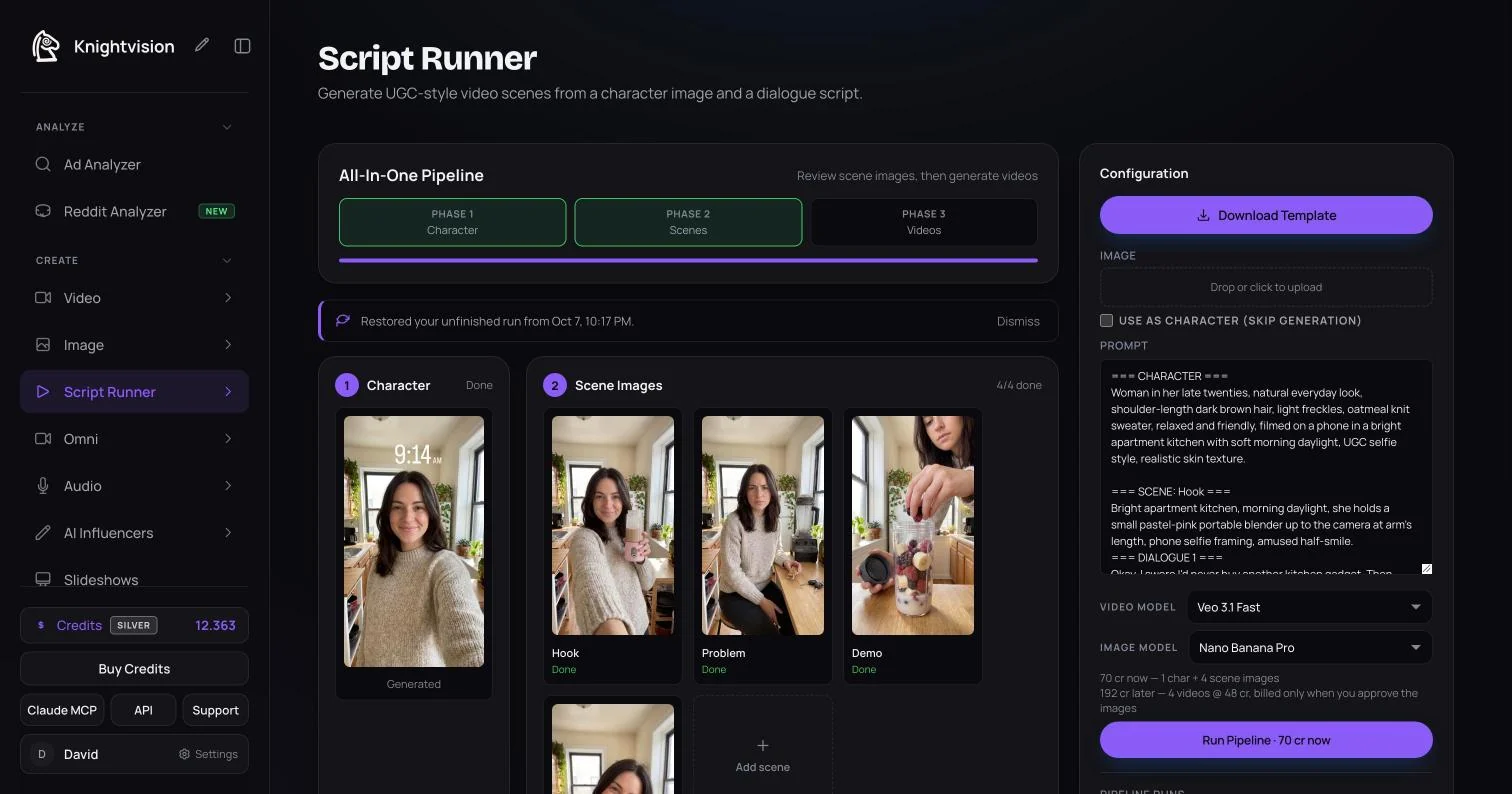
The pipeline runs in three phases. The first two are automatic and run in parallel; between the second and the third it stops and waits for you.
Phase 1: the character
If you describe the character in the script, the runner generates one 2K character image from that description. If you upload a photo and tick "Use as character (skip generation)", your photo becomes the character and the image cost disappears. If you upload a photo without ticking the box, the photo guides the generated character instead. With Gemini Omni as the video model you can also pick a saved character from your library, including a different cast per scene.
Phase 2: one storyboard image per scene
Every scene in the script becomes one image, generated in parallel, with the character image passed in as a reference. This is the storyboard: it shows you the framing, the setting and the character of each shot before any video exists. In our run the character image took 31 seconds and all four scene images were done 1 minute 34 seconds after the start, by the server's own timestamps.
The gate: review before you pay for video
The pipeline then pauses with the message "Review the scene images before generating videos". At this point you can:
- recreate an image with the same prompt, or refine the prompt and recreate it,
- remove a scene you do not need (with undo),
- add a missing scene, which costs one more image,
- or continue with "Generate N Videos", which is the only button that bills the clips.
The scene images are already paid for; the videos are charged once, when you click that button. The order of scenes, and the numbering of the dialogue, is rewritten for you if you remove or add a scene.
Phase 3: one clip per scene
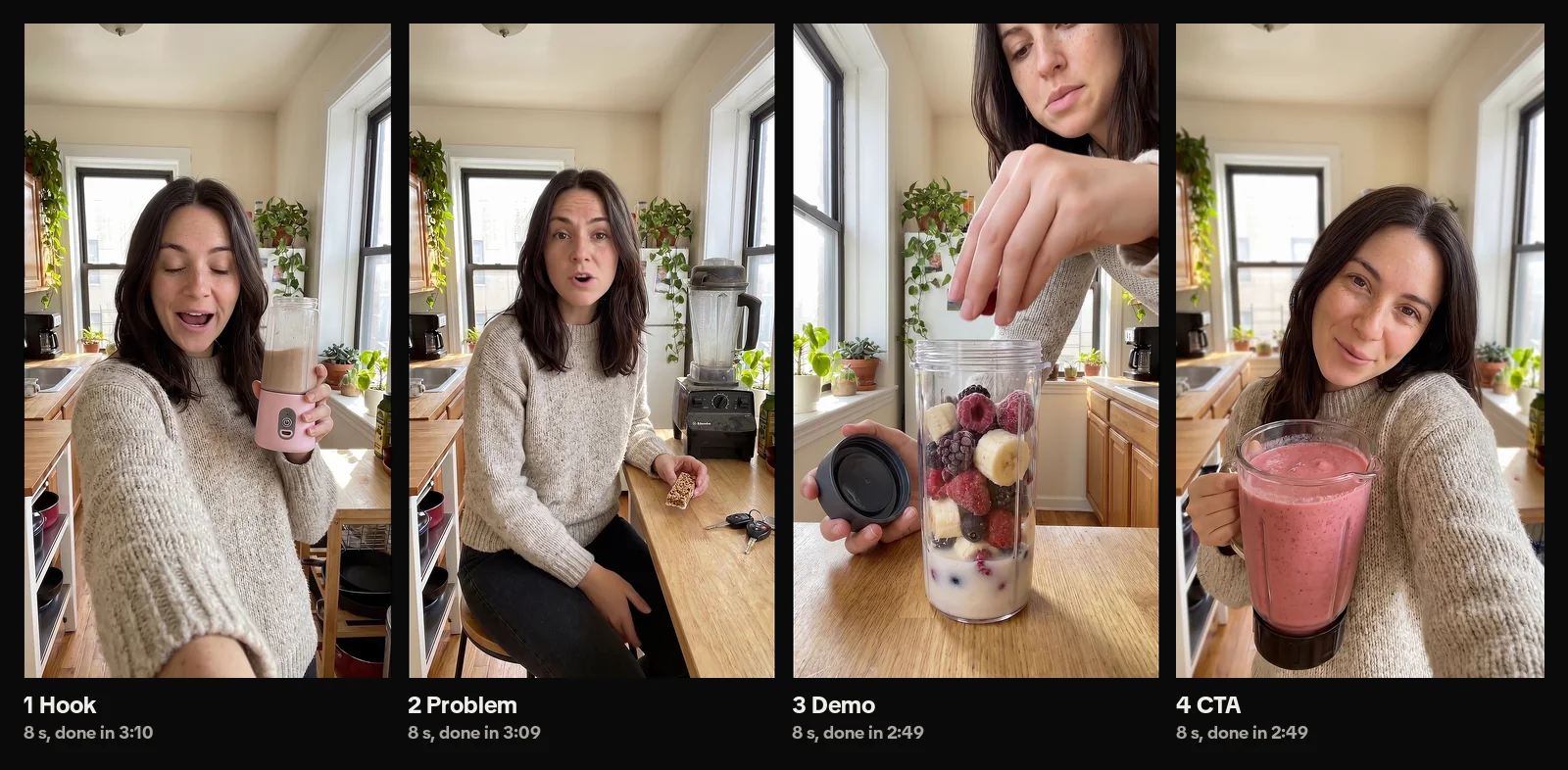
Each scene image becomes the first frame of its clip, and the scene description plus the dialogue become the prompt. The clips generate in parallel. When they are done you download them one by one, or combine them in scene order with "Merge All Clips" for a flat 100 credits. Failed clips get a retry button and the credits for a failed generation are returned automatically.
Every run is saved under "Pipeline Runs" in the sidebar. A page reload, a different device or a closed laptop does not lose a run that is still generating; the row exists on the server before the first image is billed.
What does an AI UGC ad cost with the Auto Script Runner?
Knightvision bills in credits, and 1 credit is $0.01. A run has two parts: the images, billed when you start, and the videos, billed at the gate.
| Video model | Clip length | Resolution | Credits per clip | USD per clip |
|---|---|---|---|---|
| Veo 3.1 Fast (default) | 8 s | 1080p | 49 | $0.49 |
| Veo 3.1 Quality | 8 s | 1080p | 178 | $1.78 |
| Kling 3.0 | 5 s | 1080p, no audio | 65 | $0.65 |
| Gemini Omni | 8 s | 1080p | 140 | $1.40 |
| Seedance 2.0 | 5 s | 1080p | 360 | $3.60 |
| Seedance 2.5 | 5 s | 1080p | 555 | $5.55 |
| Image model | Credits per image | USD per image |
|---|---|---|
| Nano Banana Pro (default) | 15 | $0.15 |
| GPT Image 2 | 24 | $0.24 |
| GPT Image 2.5 Flare or Sunburst | 28 | $0.28 |
A worked example at list prices, four scenes, default models:
- Start: 1 character image + 4 scene images = 5 x 15 = 75 credits
- Gate: 4 clips x 49 = 196 credits
- Total: 271 credits, or $2.71. Add 100 credits if you merge the clips into one file.
Our own run came to 262 credits (70 at the start, 192 at the gate) because the account is on the Silver rank, which takes one credit off every image and clip. Uploading your own photo with "Use as character" saves the character image entirely. Clip length is fixed per model, so a 16-second ad is two Veo scenes or four Kling scenes, and the price scales with the number of scenes, not with words.
See how AI video credits and costs work and the full model price list for every model and top-up pack.
How long does a run take?
Measured on the production app on October 8, 2026, four scenes, Nano Banana Pro images and Veo 3.1 Fast clips:
| Step | Time |
|---|---|
| Run clicked | 0:00 |
| Character image done | 0:31 |
| All four scene images done, gate shown | 1:34 |
| Each clip after approving the gate | 2:49 to 3:10, all four within 3:10 |
| Total, including a short look at the storyboard | about 5 minutes 30 seconds |
Provider queues vary, so treat the video phase as a range rather than a promise; the app waits up to 15 minutes per clip before it tells you to check the clip in your videos later. Everything else in the pipeline is fast enough to run while you write the next script.
Why generate the whole ad from one script instead of clip by clip?
Generating UGC ads one prompt at a time has three problems: the person changes between clips, you pay for a video before you know whether the shot works, and the sequence lives in your head instead of in the tool. The Auto Script Runner is built around those three problems.
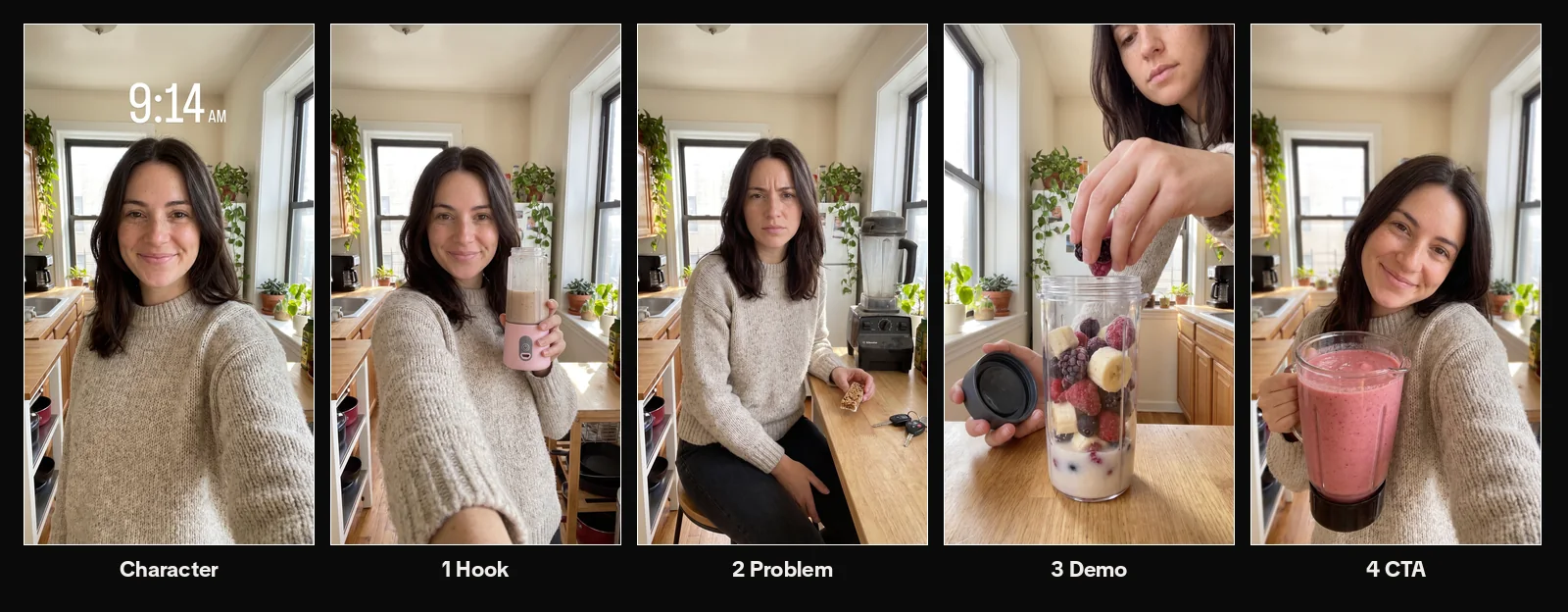
- Consistency comes from the reference, not from luck. Every scene image is generated against the same character image, and every clip starts from its scene image. The same face, hair and sweater carry through the ad without any re-prompting.
- You approve the storyboard before the expensive part. Images cost 15 credits, clips cost 49 and up. The gate lets you fix the cheap layer first.
- Parallel generation. Four scene images and four clips generate at the same time, not in sequence.
- The run is a saved object. Script, character, images and clips stay together under Pipeline Runs, so a second variant with a new hook is a paste, not a rebuild.
How this compares with creator UGC and with a manual AI workflow:
| Creator UGC | AI clips one by one | Auto Script Runner | |
|---|---|---|---|
| Cost per ad | Creators typically charge $150 to $500 per video (inBeat, June 2026); beginner rates start around $150 to $400 per piece (JoinBrands, August 2026) | Credits per clip, plus the clips you discard | 271 credits ($2.71) for four scenes at list price |
| Turnaround | Typically 2 to 3 weeks from brief to approved content once shipping and revisions are included (Soona) | Minutes per clip, hours per ad with retries | Under 2 minutes to the storyboard, then one video phase |
| Character consistency | Real person, always consistent | Depends on the prompt and the model | Reference image carried through every scene |
| Revisions | A revision round adds days | Re-prompt and pay again | Fix a storyboard image before the video is billed |
The volume problem is what makes this matter. Billo's September 2026 benchmarks suggest 3 to 5 new creatives per week for brands spending $5,000 to $15,000 a month on ads, 8 to 15 per week in the $15,000 to $50,000 tier, and a Meta refresh every 2 to 4 weeks (Billo). Segwise puts a creative's useful life at roughly 30 days at $10,000 a month and under a week at $100,000 (Segwise, August 2026). At those cadences, a $2.71 four-scene draft is a test, not a bet.
One honest caveat: AI ads are not a drop-in replacement for human creative. Ipsos tested 20 ads with 3,000 US consumers in May 2026 and found human-made ads 14% stronger on short-term effectiveness and 17% stronger on long-term brand equity, while the AI ads held up on direct, product-driven briefs (Ipsos, May 2026). The practical reading: use the Auto Script Runner to test hooks, angles and offers at scale, and give the winning angle to a creator when it needs emotion or a story arc.
How do you write a script the Auto Script Runner can parse?
The runner reads a plain-text block format. "Download Template" in the sidebar loads a filled example; here is the structure:
=== CHARACTER ===
Who the person is: age, look, clothes, where they are, how it is filmed.

=== SCENE: Hook ===
What the camera sees in this shot.
=== DIALOGUE 1 ===
The spoken line for this scene.

=== SCENE: Problem ===
...
=== DIALOGUE 2 ===
...
Three rules keep it clean:
- One scene is one clip. Clip length is fixed per model, so a scene with a 40-word line will be cut off. Aim for 15 to 22 spoken words per 8-second Veo scene and about 12 per 5-second Kling or Seedance scene.
- Scene text is what the camera sees, dialogue is what the person says. Put the product, the framing and the action in the scene; put nothing visual in the dialogue.
- Write the dialogue the way people talk. Contractions, one claim per line, a specific detail instead of an adjective. "I rinse it under the tap and it's clean" beats "it is incredibly easy to clean".
The script from our run, for a portable blender, used the classic hook, problem, solution, call-to-action arc. It is a made-up example product, not a client:
=== CHARACTER ===
Woman in her late twenties, natural everyday look, shoulder-length dark brown hair,
light freckles, oatmeal knit sweater, relaxed and friendly, filmed on a phone in a
bright apartment kitchen with soft morning daylight, UGC selfie style.

=== SCENE: Hook ===
Bright apartment kitchen, morning daylight, she holds a small pastel-pink portable
blender up to the camera at arm's length, phone selfie framing, amused half-smile.
=== DIALOGUE 1 ===
Okay, I swore I'd never buy another kitchen gadget. Then this tiny blender took over my mornings.

=== SCENE: Problem ===
Same kitchen, she sits at the counter with a half-eaten granola bar and car keys next
to her, mildly annoyed, a bulky full-size blender gathering dust in the background.
=== DIALOGUE 2 ===
Before this, breakfast was a granola bar in the car. The big blender was loud, messy, and I never used it.

=== SCENE: Demo ===
Close-up at the counter, she drops berries and banana slices into the portable blender,
lid in her other hand, daylight from the window, the blender fills the frame.
=== DIALOGUE 3 ===
Now it's berries, a banana, some oat milk, thirty seconds, done. I rinse it under the tap and it's clean.

=== SCENE: CTA ===
She leans toward the camera holding the blender full of pink smoothie, warm smile,
kitchen softly out of focus behind her.
=== DIALOGUE 4 ===
If your mornings are chaos too, the link is below. Honestly, get the pink one.
Where the script comes from is up to you. If you are rebuilding a competitor's winning ad, the Ad Analyzer gives you its scene-by-scene replication script, including the hook, the pacing and the on-screen text; you then move the scenes into the block format above. For writing from scratch, how to script a UGC-style video ad covers the hook, problem, solution, CTA arc in more depth, and create AI video ad hooks is the place to go for variants of the first line.
Which video model should you pick for UGC ads?
All four Veo 3.1 Fast clips in our run came back at 1080 x 1920 with the dialogue spoken by the character on the audio track, word for word as written in the script (we transcribed them to check). Kling 3.0 clips are generated without sound in Auto Mode. Pick the model by what the scene needs:
- Veo 3.1 Fast (default) is the sensible starting point for talking-to-camera scenes: 8 seconds, 1080p, 49 credits, and it speaks the line.
- Veo 3.1 Quality is the same clip length with more detail for 178 credits; use it on the winner, not on the test batch.
- Kling 3.0 gives 5-second clips at 65 credits and is generated without audio in Auto Mode, so it suits B-roll and silent product shots you caption later.
- Gemini Omni is the only model that lets you cast up to three saved library characters per scene and change the cast between scenes; 8 seconds, 1080p, 140 credits.
- Seedance 2.0 and 2.5 are the premium options at 360 and 555 credits for 5 seconds, for product-heavy shots where motion quality matters more than cost per test.
Model guides: Veo, Kling, Seedance, and the general how to choose a video model.
What are the limits?
- Vertical only. Runs render in 9:16. Landscape and square are not options in Auto Mode.
- Clip length is fixed per model. 8 seconds for Veo and Omni, 5 seconds for Kling and Seedance. You control length by the number of scenes.
- One clip per scene. There is no scene cap in the app, but every scene is one paid image and one paid clip, so a 20-scene script is a 20-clip bill.
- Scene text has a prompt limit. Kling prompts are capped at 2,500 characters; keep scene descriptions to a few lines.
- Characters per scene depend on the model. Multiple characters per scene need Gemini Omni; the other models carry one character through the run.
- Credits, not a flat fee. Pro is $39.99 a month with 3,000 credits each cycle, and failed generations are refunded automatically. The 14-day money-back guarantee covers the first payment if no credits were used.
Can you run it through the API?
Yes. The Partner API has a script-runner endpoint that takes the same block format plus a character image and returns a job you poll for the finished clips. One request is one run of up to 20 scenes, rendered at 720p in 9:16, with a frame and a clip per scene. Per-scene prices on the standard basis are 55 credits with Veo 3.1 Fast, 164 with Veo 3.1 Quality, 114 with Kling 3.0, 159 with Seedance 2.0 and 239 with Seedance 2.5; self-serve API accounts pay the standard rate plus 10% and need no subscription. The API reference has the request body and the modes, and AI UGC video API shows how the pieces fit into a presenter workflow.
FAQ
Do AI UGC ads work?
They work best as a testing layer. Ipsos's May 2026 study of 20 ads and 3,000 US consumers found human-made ads 14% stronger on short-term effectiveness and 17% stronger on long-term brand equity, while the AI ads held up on direct, product-driven briefs. Use the Auto Script Runner to test hooks and angles at a few dollars per ad, then scale the winners, with real creators where the angle needs emotion.
How much does an AI UGC ad cost with the Auto Script Runner?
Each scene costs one storyboard image plus one video clip. With the default models (Nano Banana Pro at 15 credits per image, Veo 3.1 Fast at 49 credits per 8-second clip) a four-scene ad is 75 credits of images and 196 credits of video, 271 credits in total, which is $2.71. Merging the clips into one file costs 100 credits. Rank discounts can lower the per-unit price.
Can I use my own photo as the character?
Yes. Upload a photo in the Image box. Tick "Use as character (skip generation)" to use it directly and skip the character image cost, or leave it unticked to use the photo as a reference for a generated character.
Does the character stay the same in every scene?
The character image is passed as a reference to every scene image, and each scene image becomes the start frame of its clip, so the same face, hair and outfit carry through the whole ad. Review the storyboard before generating videos; if one scene drifts, recreate just that image.
Can I fix a scene before paying for the video?
Yes. After the scene images are generated the pipeline pauses. You can recreate an image, refine its prompt and recreate, remove a scene, or add a scene for the cost of one image. Videos are billed only when you click the generate button.
Do I need a subscription to use the Auto Script Runner?
You need credits. Knightvision Pro is $39.99 a month and includes 3,000 credits every cycle; top-up packs are available in the app. The Auto Script Runner itself is open to every logged-in account with no extra plan, and developers can call it through the Partner API with no subscription at the standard rate plus 10%.
Which aspect ratio and clip length do I get?
Vertical 9:16, the format for TikTok, Reels and Shorts. Clip length is fixed per model: 8 seconds with Veo 3.1 Fast, Veo 3.1 Quality and Gemini Omni, 5 seconds with Kling 3.0, Seedance 2.0 and Seedance 2.5. Write about 15 to 22 spoken words per 8-second scene.
Is there an API for the Auto Script Runner?
Yes. One request to the Partner API script-runner endpoint takes the same block format plus a character image and returns a job you poll for the finished clips. Up to 20 scenes per run, rendered at 720p in 9:16. Per-scene prices on the standard basis range from 55 credits (Veo 3.1 Fast) to 239 credits (Seedance 2.5).
Try the Auto Script Runner
Open Knightvision, go to Script Runner, load the template, replace the character and the scenes with your product, and click Run. You will see the storyboard in about two minutes and pay for the videos only if you like it. Plans and credit packs are on the pricing page.
"Best platform for AI UGC and especially carton n animation ads as it saves a lot of time thanks to the scriptrunner." Anton, Trustpilot review, May 15, 2026
For the end-to-end workflow from a competitor ad to a finished AI UGC video, the founder walkthrough on YouTube covers analysis, script and generation in one sitting: AI UGC full tutorial with Knightvision.